Book Purchase Instructions

1. Log into Buy My Books using your My Hamilton username and password.
a. Select the term for which you are purchasing books and supplies.
b. Your classes and the appropriate books and supplies will be listed.
2. Select the book format - purchase a physical copy or digital (if available).
a. If RENTAL is selected, you must enter a credit card number to proceed to the checkout. The credit card will only be charged if the books are not returned after the rental period; your books will still be covered by Financial Aid.
b. Required course supplies will also be paid for by financial aid. Select ADD TO CART to include them.
3. Proceed to the Checkout
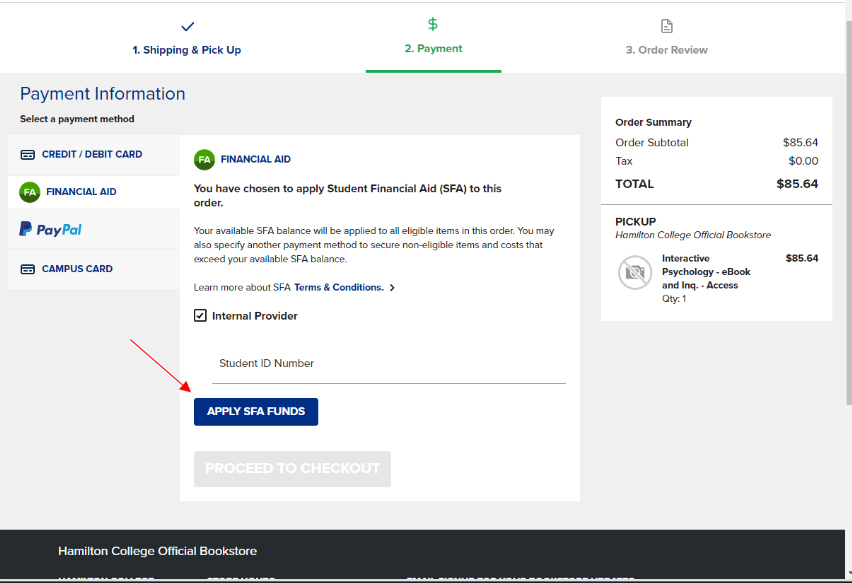
a. Select Financial Aid under payment method and enter your Student ID Number.
b. Click Apply SFA Funds button, and your books and supplies expenses will be paid by the Office of Financial Aid.
4. You will receive an email when your order is available for pickup. (approx. 24-48 hours after the order is placed).
A packet of basic academic supplies has also been prepared for you and it will be available for pickup with your book order.
For further assistance, email the Campus Store at: hambooks@hamilton.edu
Store website: hamilton.edu/bookstore
Contact
Office of Financial Aid